Rajan Kumar
Founder, BiodataBuilderRajan built BiodataBuilder to help millions of Indians create professional marriage biodatas easily. With expertise in Indian matrimonial traditions and 2M+ biodatas created on the platform, his guides cover every regional format, community custom, and modern best practice.
Last Updated:
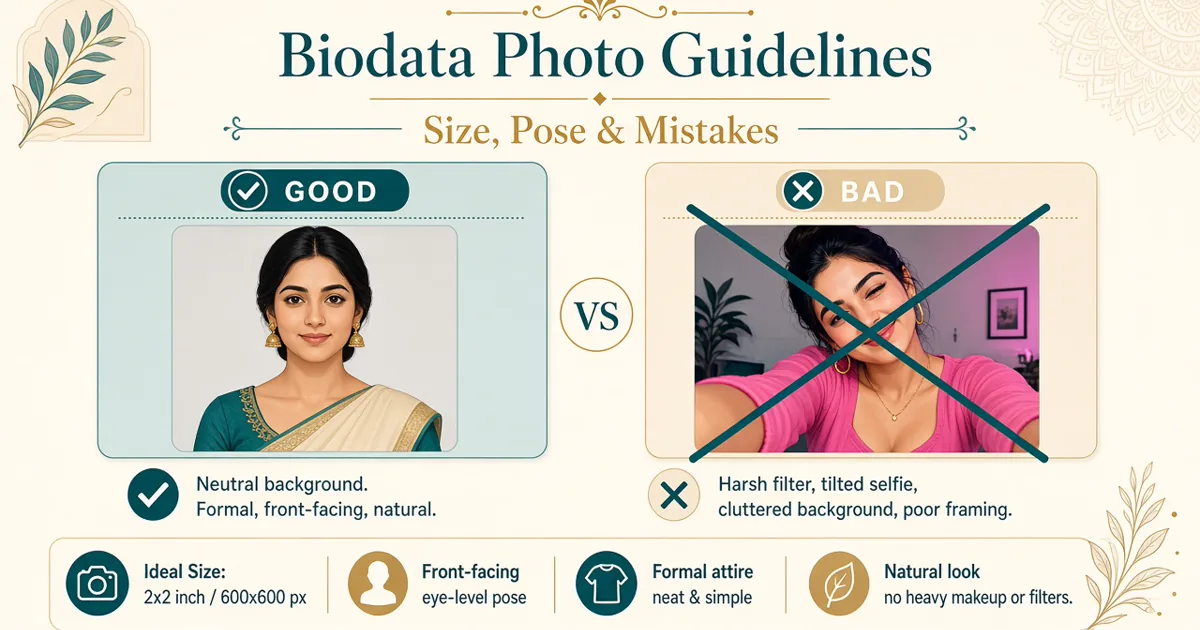
Biodata Photo Guidelines — Size, Pose & Mistakes
Your biodata photo is seen before your name. Pick a clear, recent solo portrait — then size it for WhatsApp so elders can open the PDF without waiting.
TL;DR
- Prefer studio / passport-style solo shots over busy casual selfies.
- Plain background, respectful attire, natural smile — no couple photos or heavy filters.
- Upload in the free biodata maker and keep the PDF light for WhatsApp.
Combine a strong photo with solid content from biodata format, biodata tips, biodata for marriage, and biodata format for WhatsApp.
Upload your photo into a template and export PDF free.
Open makerBest photo type — studio / passport vs casual
Studio or passport-style portraits win for arranged-marriage biodatas: even lighting, plain backdrop, face clearly visible. Casual phone photos work only if lighting is good, the background is calm, and attire is meeting-ready.
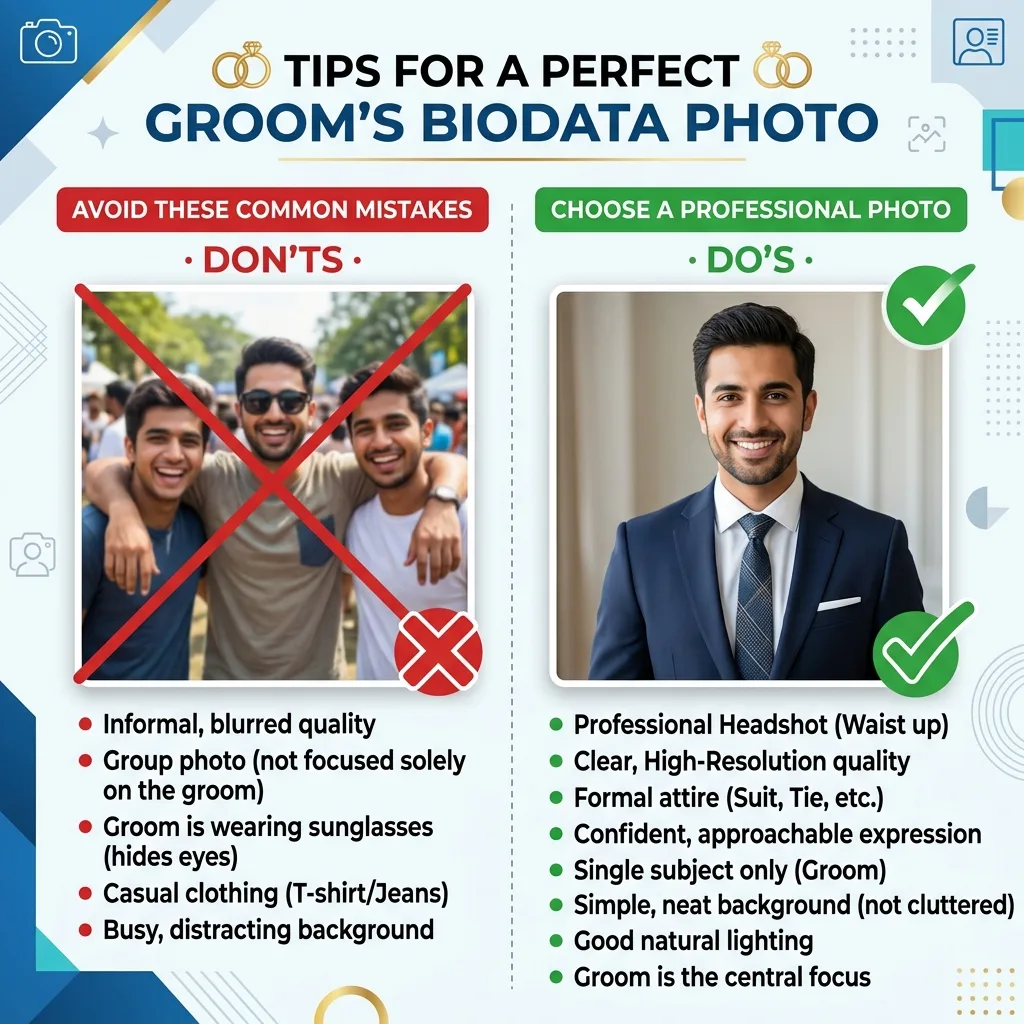
Groom examples: marriage biodata for boy. Bride examples: shaadi biodata format for girl.
Background, attire & smile
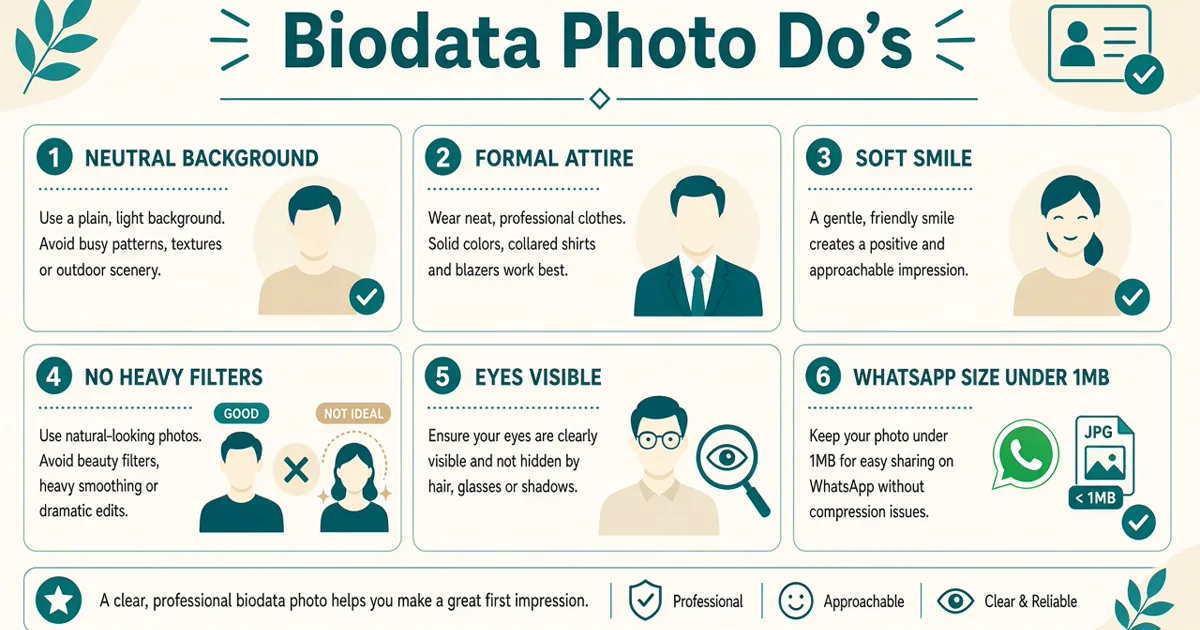
- Background: white wall, soft studio grey, or uncluttered outdoor — not busy tourist spots or messy rooms.
- Attire: traditional or smart-casual you would wear to meet the other family; avoid party wear and heavy jewellery that distracts.
- Smile: natural and warm. Stiff passport stares feel cold; exaggerated duck-face poses feel unserious.
Pair the photo with a real About Me: how to write biodata About Me.
Studio vs home DIY lighting
A ₹400–800 studio passport session remains the safest choice for Indian arranged-marriage biodatas. Soft box light removes under-eye shadows, the backdrop is plain, and the photographer crops for face visibility. Families in Delhi, Hyderabad, and Pune still treat a clean studio shot as a seriousness signal — especially when the PDF goes to elders first.
Home DIY works when you cannot reach a studio before a relative asks for the file tonight. Stand facing a window (not with the window behind you). Turn off yellow tube lights that tint skin orange. Use a plain wall — white, cream, or light grey — without calendars, God frames, or hanging clothes in the frame. Hold the phone at eye level; shooting from below exaggerates the chin; shooting from above hides the face.
Quick DIY setup that families accept
- Morning or late-afternoon window light; avoid noon glare on the forehead.
- Ask a sibling to hold a white bedsheet opposite the window as a soft reflector.
- Clean the phone lens — fingerprint smudges make "soft" faces look blurry on WhatsApp.
- Take 8–10 frames; pick the one where both eyes are open and the smile is natural.
If the DIY shot still looks dim, mild brightness in the phone editor is fine. Do not use beauty-mode skin blur — it clashes with a real meeting later. For layout context after you pick the image, see simple one-page marriage biodata and modern vs traditional biodata.
Attire by community & faith markers
Dress for the family that will open the PDF, not for Instagram. Light colours photograph cleaner than deep black or neon. Avoid party sequins, club wear, and heavy bridal jewellery that suggests a wedding already happened.
Practical attire notes
- Hindu / general: men — light kurta or formal shirt; women — sober saree, salwar, or modest kurti. Match community norms without costume-level exaggeration.
- Muslim: hijab or modest attire is fine and expected in many families — keep the face fully visible (no niqab crop for the biodata portrait). See Muslim marriage biodata format.
- Sikh: turban and beard are normal identity markers — frame so the full face and turban colour are clear, not cut at the forehead. Related: Punjabi biodata format.
- Christian / others: smart formal or modest traditional wear works; skip cocktail dresses. See Christian marriage biodata.
Glasses, beard, hijab, turban
Wear glasses if you wear them daily — removing them only for the photo causes meeting-day surprise. Anti-glare lenses help; tilt the chin slightly so window light does not bounce as a white rectangle over the eyes. Keep the beard trimmed the way you will appear for the first visit; do not submit a clean-shaven passport from five years ago if you now keep a full beard.
Hijab and turban photos should show both eyes, eyebrows, and a natural expression. Avoid heavy shadow under the chin from overhead kitchen lights. For faith-specific field layout beyond the photo, compare Hindu marriage biodata format and regional guides such as Bengali biodata format.
Phone camera settings & outdoor golden hour
Use the rear camera, not the front selfie camera — rear sensors are sharper and distort the face less. Stand about an arm-and-a-half away so the lens does not widen the nose. Tap the face on screen to lock exposure; if your phone shows HDR, leave it on for indoor windows. Prefer 1x (main) lens over ultra-wide — ultra-wide bends walls and faces.
- Resolution: full size, then compress later if the PDF is heavy — do not start from a Status screenshot.
- Portrait mode: optional, but keep edge blur gentle so hair and ears do not look cut out.
- Flash: usually off indoors; flash against a white wall creates deer-in-headlights eyes.
- Timer + tripod / stack of books: reduces handshake blur when a sibling is unavailable.
Golden-hour outdoor tips
Forty minutes after sunrise or before sunset gives soft, flattering light. Stand in open shade (next to a building, under a tree with even shade) rather than harsh sun that creates raccoon eyes. Keep the background simple — a compound wall or garden hedge beats a crowded café. Ask the helper to step back so you are not cropped mid-chest awkwardly.
Outdoor shots fail when the background is a tourist selfie spot (India Gate, beach crowds). Families skim for face clarity, not travel bragging. Pair a calm outdoor portrait with solid fields from education & career in biodata so the PDF feels complete, not just pretty.
Common mistakes — couple photos, filters & WhatsApp size
Couple photos — no
Never use couple, group, or cropped friend photos. A marriage biodata introduces you. Anything else looks confusing or premature.
Filters
Skip beauty filters and face-reshape apps. Mild exposure fixes are fine. Authenticity matters more than a glossy feed look.
WhatsApp & file size
Share as PDF, not Word. Aim for the whole biodata under ~2 MB so older phones open it instantly. Compress photos gently if the file is heavy — blurry compression is worse than a slightly larger clear shot.
More on sharing: biodata format for WhatsApp · biodata format PDF download.
Crop tips, template slots & before/after mindset
Crop to head and shoulders. Leave a little space above the head; keep eyes in the upper third; do not cut chin or forehead. Centre the face — off-centre party crops look accidental.
Cropping for biodata template slots
Most one-page templates use a vertical oval or rectangle on the top-right or top-left. Upload a photo that is already roughly square or portrait (3:4), not a wide landscape group crop. If the face sits in a corner of a large wedding hall photo, crop tightly first on the phone, then upload — otherwise the template will zoom into empty wallpaper.
- Leave ~10% headroom above hair/turban so the oval does not clip the crown.
- Shoulders should be visible enough to show attire colour; mid-chest is usually the lower edge.
- Export from the maker and open the PDF on your phone — if the face looks tiny, re-crop closer.
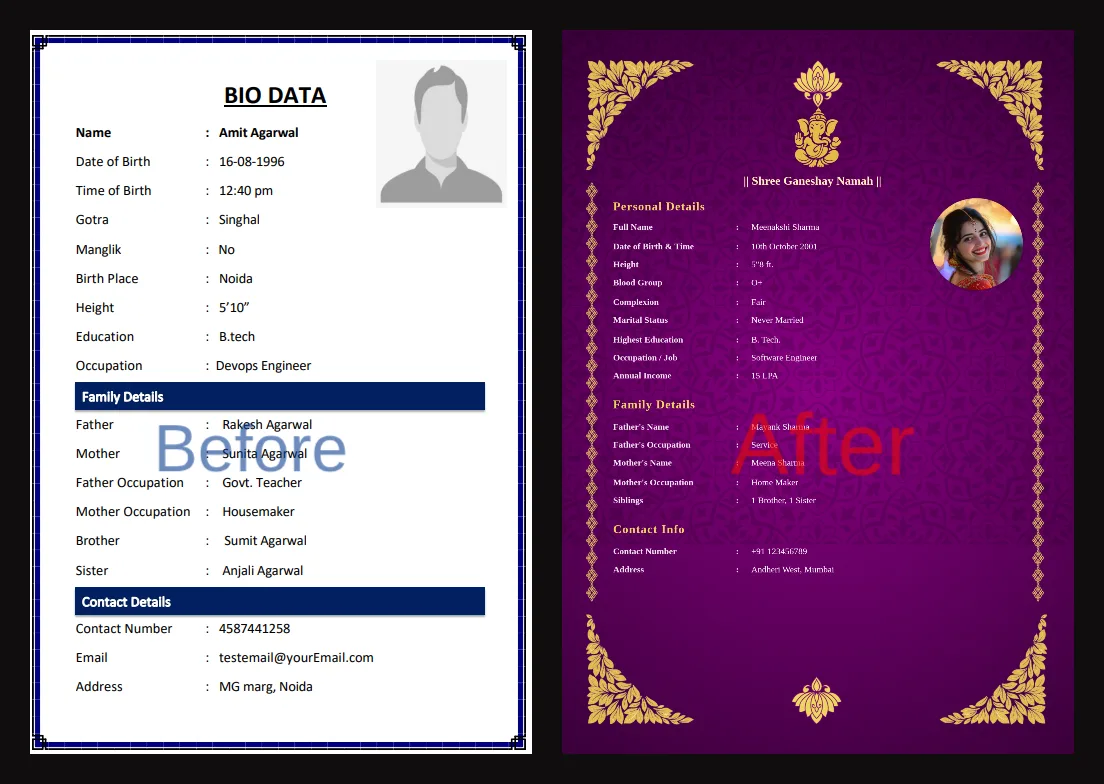
Before/after mindset: ask whether a stranger's parent would recognise you from this photo in a living-room meeting. If not, retake. See full samples in biodata sample for marriage.
Multiple photos when asked later
Keep one primary biodata portrait on the PDF. When a serious family asks for "2–3 more photos," send additional clear solo shots in the chat — full-length in traditional wear, a second headshot, maybe a casual outdoor — as separate images, not stuffed into the one-page biodata. Never send album dumps of parties. For privacy when sharing extras, read contact details & privacy.
WhatsApp compression damage & age of photo
Sending the portrait as a normal WhatsApp photo (not inside a PDF Document) crushes detail — skin texture becomes blotchy and eyes soften. Elders then forward that mushy image again, and quality drops further. Always embed the photo in a PDF biodata and send as Document. If someone needs a raw photo later, send the original as Document too, or use "HD" / file transfer — not Status, not a compressed chat image.
- Screenshot of a screenshot of a forwarded JPEG — often rejected as "unclear photo"
- Original from gallery → BiodataBuilder upload → light PDF Document
How old can the photo be?
Prefer a photo from the last 6–12 months. College farewell snaps from four years ago, pre-weight-change photos, or pre-spectacles portraits create awkward first meetings. If you grew a beard, changed hair length, or started wearing a hijab/turban daily, update the biodata image before the next round of sharing.
NRI families sometimes reuse old India-visit photos — fine if the look still matches. If not, take a fresh DIY shot abroad with the window-light method above, then rebuild the PDF. Related: NRI marriage biodata format.
Why families reject biodata photos
"Photo theek nahi hai" rarely means only looks. In practice, parents use the photo as a trust and seriousness check. Common rejection reasons we hear across WhatsApp matchmaking chains:
| What they say | What they usually mean |
|---|---|
| Photo unclear / blurry | WhatsApp compression, night selfie, or heavy filter |
| Looks different from age | Old photo or DOB mismatch — see height, weight & age |
| Too casual / party look | Attire or background does not feel meeting-ready |
| Face not clear | Sunglasses, side profile, or group crop |
| Overdone makeup / filter | Fear the meeting will not match the PDF |
Fix the root cause and regenerate the PDF — do not argue over chat. A fresh, honest portrait plus a clean biodata format usually reopens the conversation.
Do's & don'ts
| Do | Don't |
|---|---|
| Recent solo portrait (within 1 year) | 3+ year-old or heavily filtered selfies |
| Plain background, face 70–80% of frame | Busy tourist / party backgrounds |
| Traditional or smart-casual attire | Party wear, sunglasses, heavy jewellery clutter |
| Natural smile, good lighting | Couple / group / cropped friend photos |
| PDF under ~2 MB for WhatsApp | Huge Word files that break on phones |
Pro tips for biodata photos
- Prefer a recent studio / passport-style solo shot over busy casual selfies.
- Crop to head and shoulders so the face fills most of the frame.
- Upload into a free BiodataBuilder template, keep the PDF under ~2 MB, and send as a WhatsApp Document.
- Match attire to what you would wear meeting the other family.
- Retake if a stranger's parent would not recognise you from the photo in person.
- For official photo/ID norms that families sometimes compare against, see UIDAI guidance on clear face photos — then use a warmer matrimonial crop for biodata.
Photo checklist
- Solo portrait only — no couple or group shots
- Taken within the last year
- Plain background and clear face
- Respectful attire + natural smile
- No heavy filters or face reshape
- Cropped head-and-shoulders; PDF light enough for WhatsApp
Checklist for parents reviewing a child's photo
Parents often finalise the PDF while the son or daughter is at office. Use this 60-second review before you forward to aunties, brokers, or the other family:
- Open the PDF on your own phone — does the face stay sharp, or turn into a blotchy WhatsApp mess?
- Would you recognise them at the temple gate or society lobby from this image alone?
- Attire respectful for your community's first meeting — not partywear from a cousin's wedding?
- No sunglasses, no second person cropped at the edge, no filter that changes skin tone drastically?
- Photo age matches current look (glasses, beard, hijab, hair length)?
- Contact block on the same PDF is privacy-safe before wide forwarding — see contact privacy.
If any answer is no, ask for a retake tonight with window light rather than forwarding a weak file to twenty relatives. One clear portrait protects reputation better than ten blurry forwards.
After the photo passes, fill family and personal lines carefully using about my family, what to include, and biodata tips.
Add your photo to a free PDF biodata
Create free biodataFAQ
Which photo is best for marriage biodata?
A recent head-and-shoulders portrait with a plain background and formal or traditional attire. Face should fill about 70–80% of the frame. Studio or passport-style shots outperform casual selfies for family sharing.
Is a studio photo better than a casual photo?
Studio or passport-style usually wins for clarity and trust. A well-lit casual outdoor shot with a plain wall can work if your face is clear and attire is respectful — avoid party or travel clutter.
Can I use couple photos in marriage biodata?
No. Marriage biodata is for finding a match — use a solo portrait only. Couple, group, or cropped wedding-guest photos confuse families and look unprofessional.
What file size works for WhatsApp biodata photos?
Keep the full PDF under ~2 MB so elders' phones open it quickly. The photo itself is typically fine at 200–500 KB when compressed without heavy blur. Prefer PDF over Word for WhatsApp sharing.
Should I use filters or beauty apps?
Avoid heavy filters, skin smoothing, and face reshape apps. Mild brightness/contrast is fine. Families notice when the meeting looks nothing like the photo.
How should I crop my biodata photo?
Crop to head and shoulders with a little space above the head. Centre the face, keep eyes roughly in the upper third, and avoid cutting the chin or forehead.
What attire and smile work best?
Wear what you would wear to meet the other family — traditional or smart-casual. A natural, warm smile beats a stiff passport stare or an exaggerated pose.
How old can the biodata photo be?
Prefer a photo taken within the last year. Anything older than 2–3 years risks awkward first meetings if your look has changed.
Where can I add a photo to a free PDF biodata?
Upload it in BiodataBuilder.in — templates place the photo correctly, then download PDF ready for WhatsApp.
Conclusion
A good biodata photo is recent, solo, well-lit, and honest. Follow these size and pose guidelines, avoid the usual mistakes, then place the image in a free PDF biodata template and share on WhatsApp with confidence.
What to Read Next
Ready to create your biodata?
Use our free builder to make a WhatsApp-ready marriage biodata PDF in minutes.
Open free biodata maker